Activity 10: Data Structure in Typescript

Research and Study Data Structures in Typescript
Understand the commonly used data structures in TypeScript and how they are implemented.
Focus on how TypeScript’s strong typing system enhances the use of data structures.
Explain Each Data Structure in TypeScript: For each data structure, provide the following details:
Definition: A brief explanation of the data structure.
Key Features: The important characteristics and behaviors of the data structure.
Use Cases: Where and why this data structure is typically used.
Time Complexity: Analyze the performance of each data structure (Big-O notation) for common operations like insert, delete, and search.
Example Code in TypeScript: Provide a TypeScript code snippet demonstrating how to use each data structure.
Data Structures to Cover:
Arrays:
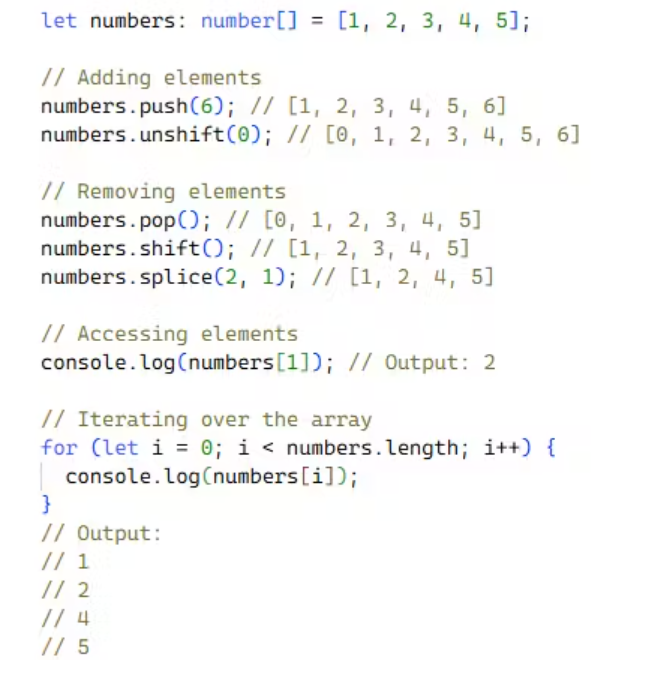
Explain how arrays are used in TypeScript.
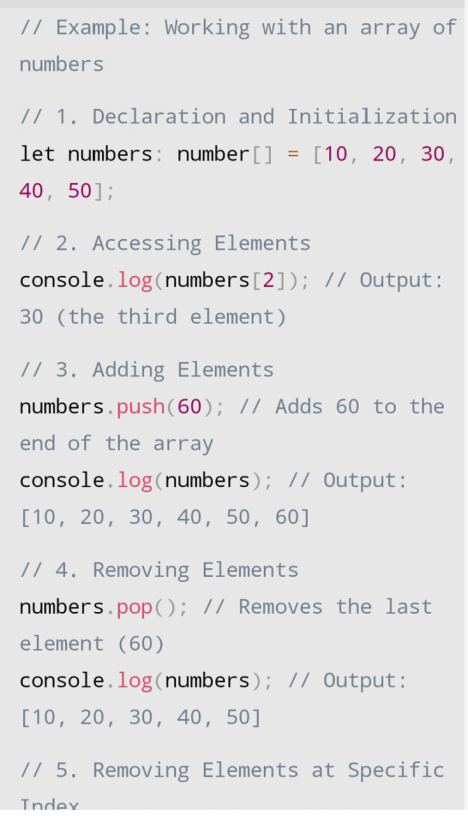
- Arrays in TypeScript are used to store multiple values of the same type in a single variable. They are similar to arrays in JavaScript but with the added benefit of TypeScript’s strong typing system, which helps catch errors at compile time.
Provide examples of operations like adding, removing, and accessing elements.
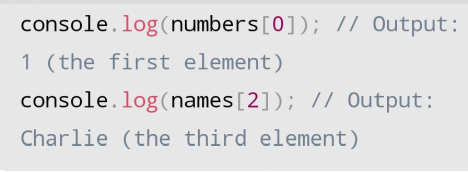
Accessing Elements
→ You can access individual elements in an array using their index, starting from 0 for the first element.
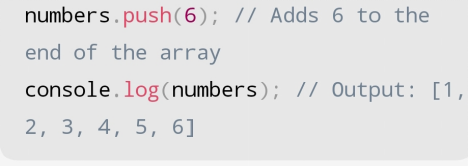
Adding Elements
You can add elements to the end of an array using the push() method.
Removing Elements
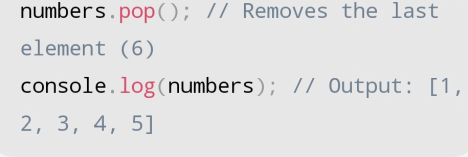
You can remove the last element of an array using the pop() method.
Declaration and Initialization
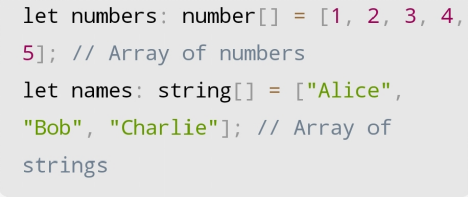
You can declare an array in TypeScript using the following syntax:

arrayName is the name of the array, dataType specifies the type of elements it will hold, and element1 , element2 , etc. are the initial values of the array.
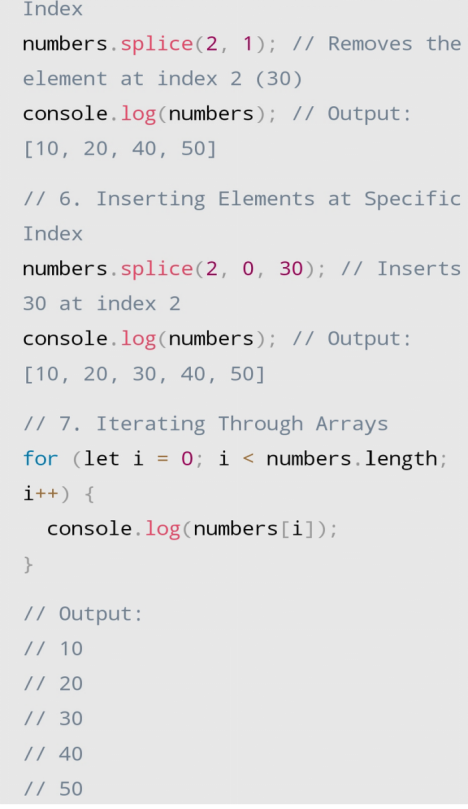
Removing Elements at Specific Index
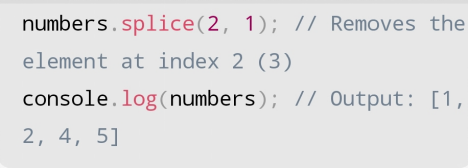
You can remove an element at a specific index using the splice() method. The splice() method takes two arguments: the starting index and the number of elements to remove.
Inserting Elements at Specific Index
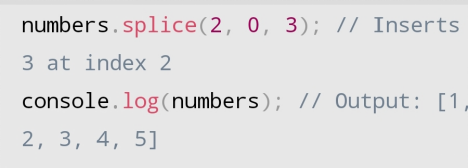
You can insert an element at a specific index using the splice() method. The splice() method takes three arguments: the starting index, the number of elements to remove (0 in this case), and the element to insert.
Iterating Through Arrays
- You can iterate through the elements of an array using a for loop.
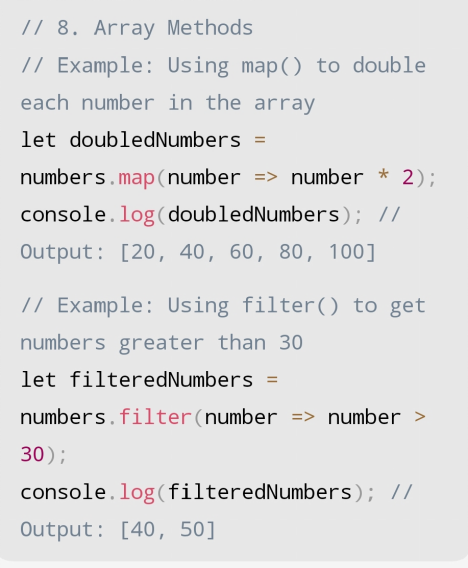
Example:
Tuple:
Explain how dynamic arrays can be created and managed in TypeScript
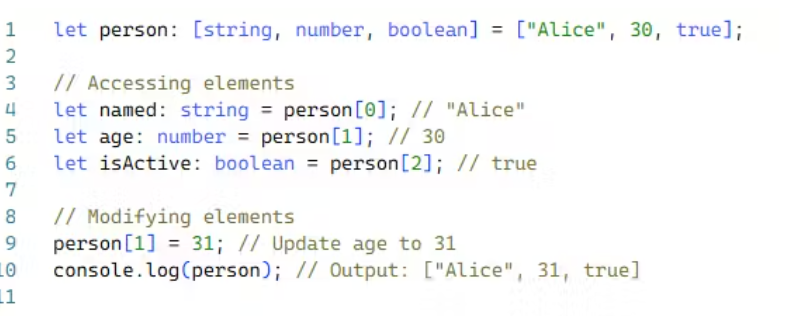
- Tuples in TypeScript are a special type of array that allows you to store a fixed number of elements where the types of each element are known. Unlike regular arrays, which can hold any number of elements of the same type, tuples can hold a specific number of elements with different types.
Provide an example of defining and accessing tuple elements.
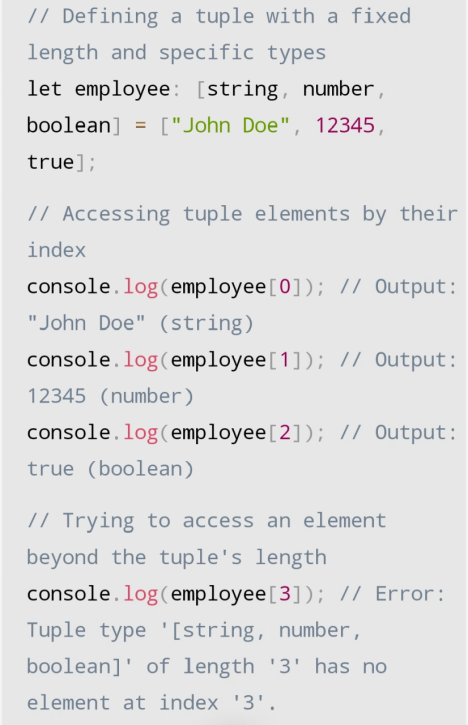
This example illustrates how to define and access tuple elements in TypeScript
Defining: The tuple employee is defined to hold three elements: a string for the name, a number for the ID, and a boolean for the status.
Accessing: Elements are accessed by their index, starting from 0.
Type Safety: TypeScript enforces type safety by preventing attempts to access elements beyond the tuple's length or assign values of incorrect types.
ArrayList (Dynamic Arrays):
Explain how dynamic arrays can be created and managed in TypeScript
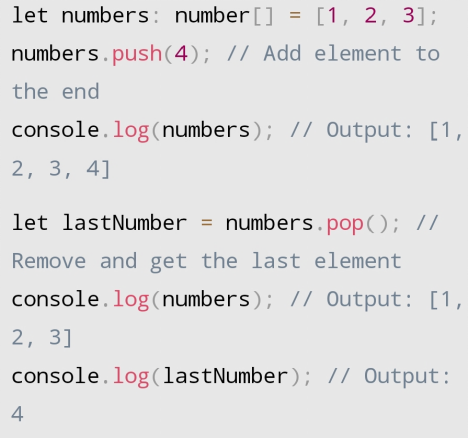
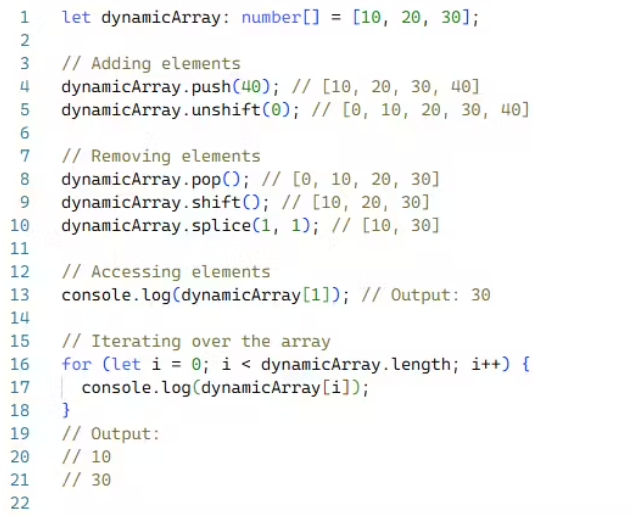
Dynamic arrays in TypeScript, much like in JavaScript, can grow or shrink in size during runtime. This flexibility allows you to add or remove elements as needed without worrying about the array’s initial size.
Using the push() and pop() Methods
push() : This method adds an element to the end of the array.
pop() : This method removes and returns the last element of the array.
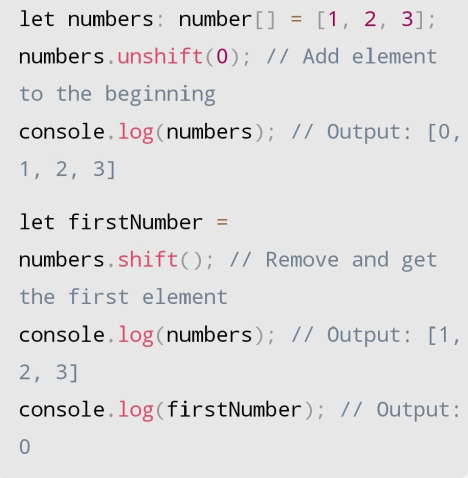
Using the unshift() and shift() Methods
unshift() : This method adds an element to the beginning of the array.
shift() : This method removes and returns the first element of the array.
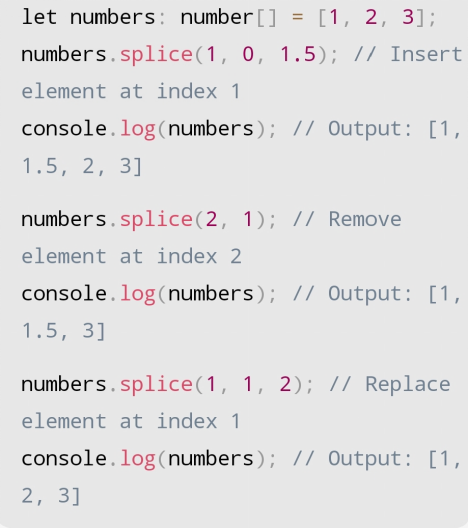
Using the splice() Method
- splice() : This method allows you to insert, remove, or replace elements at specific indices within the array.
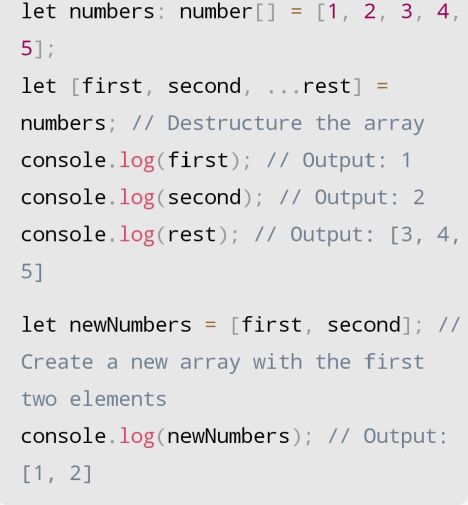
Using Array Destructuring
- You can use array destructuring to create new arrays with selected elements from an existing array.
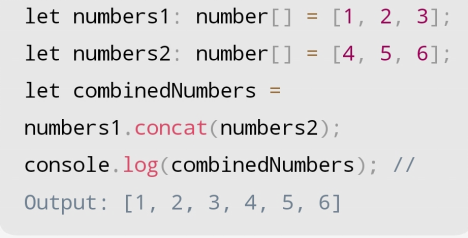
Using the concat() Method
- concat() : This method combines two or more arrays into a new array.
Using Spread Syntax
- Spread syntax ( ... ) allows you to expand an array into individual elements within another array.
Stack:
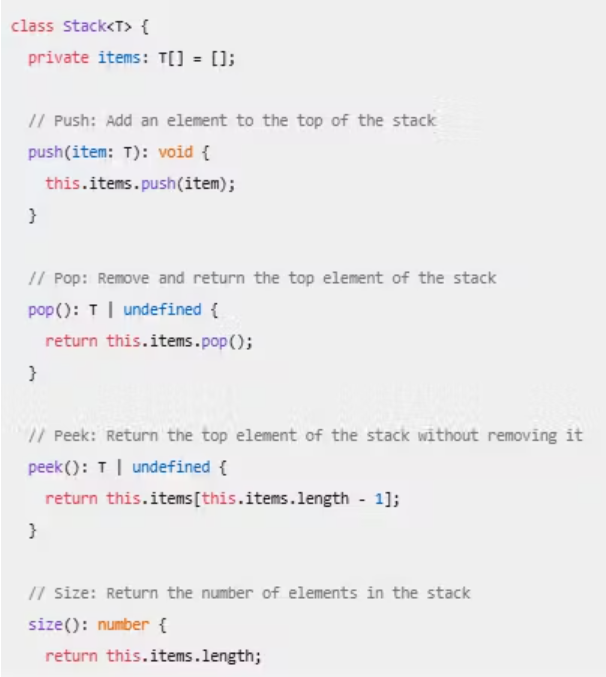
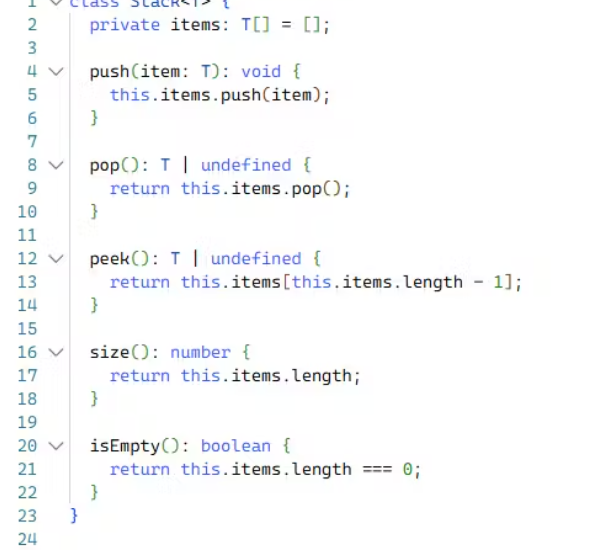
Define how to implement a stack in TypeScript using an array or a class.
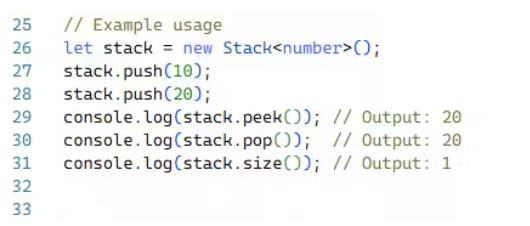
- A stack is a data structure that follows the Last In First Out (LIFO) principle, meaning the last element added to the stack is the first one to be removed. This is similar to a stack of plates where you can only take the top plate off first.
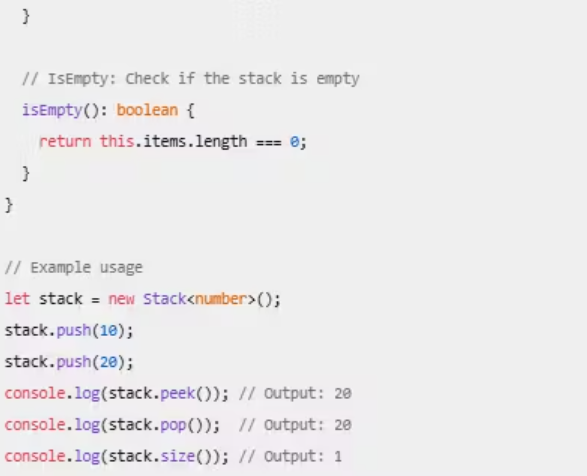
Stack Using an Array
You can implement a stack using an array in TypeScript.\
LIFO Principle
The Last In First Out (LIFO) principle means that the most recently added element is the first one to be removed. This is analogous to a stack of books where you can only take the top book off first.
Common Operations
Push: Adds an element to the top of the stack.

Pop: Removes and returns the top element of the stack.

Peek: Returns the top element of the stack without removing it.

Size: Returns the number of elements in the stack.

IsEmpty: Checks if the stack is empty.

Stack: A data structure that follows the LIFO principle.
LIFO: Last In First Out, meaning the last element added is the first one to be removed.
Common Operations:
push,pop,peek,size, andisEmpty.
Queue:
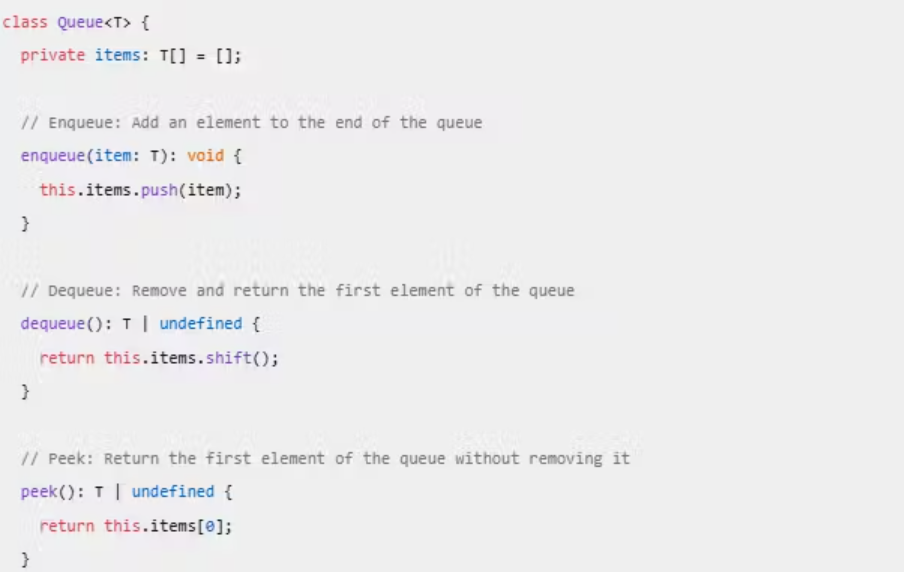
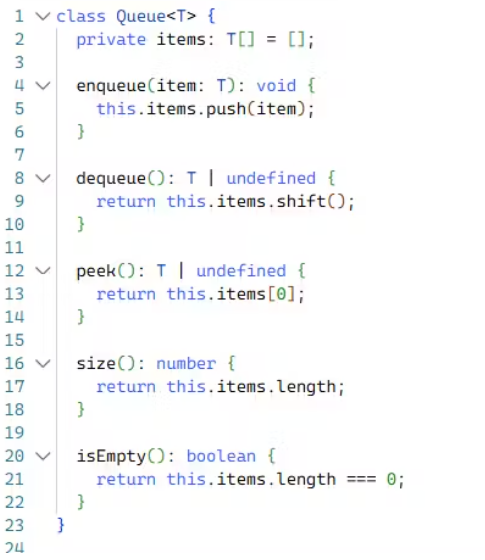
Define how to implement a queue in TypeScript.
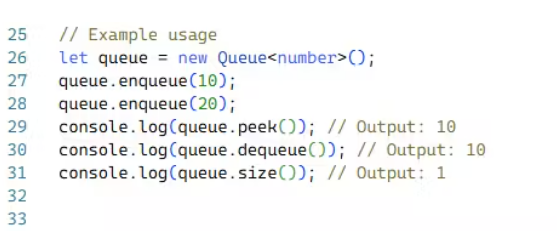
Explain the First In First Out (FIFO) principle and common operations (enqueue, dequeue).
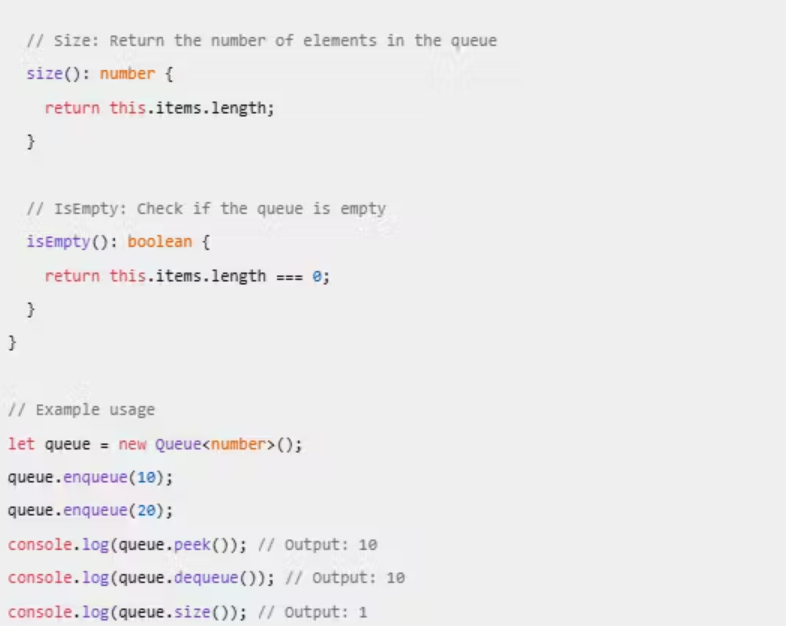
A queue is a data structure that follows the First In First Out (FIFO) principle, meaning the first element added to the queue is the first one to be removed. This is similar to a line of people waiting for a service, where the person who arrives first is served first.
Implementing a Queue Using a Class
You can implement a queue in TypeScript using a class.
FIFO Principle
The First In First Out (FIFO) principle means that the first element added to the queue is the first one to be removed. This is analogous to a line at a ticket counter where the person who arrives first is served first.
Common Operations
Enqueue: Adds an element to the end of the queue.

Dequeue: Removes and returns the first element of the queue.

Peek: Returns the first element of the queue without removing it.

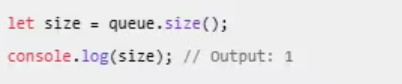
Size: Returns the number of elements in the queue.
IsEmpty: Checks if the queue is empty.

LinkedList:
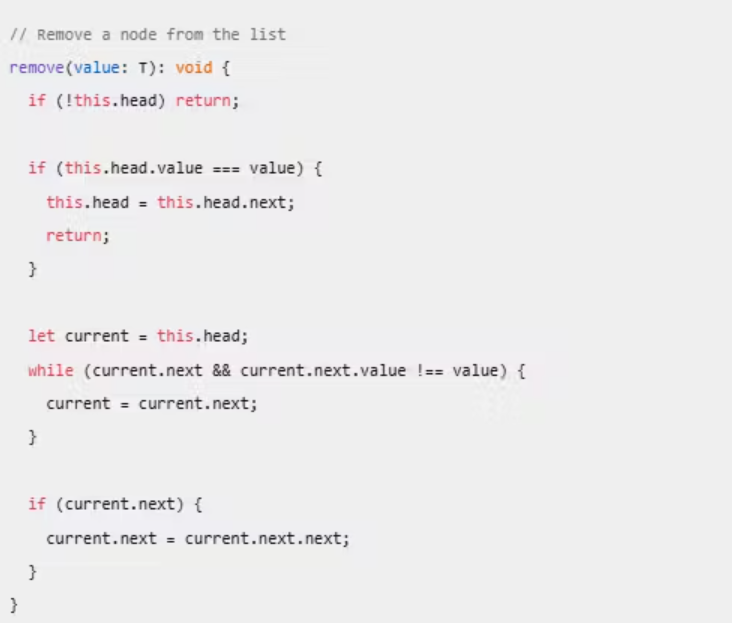
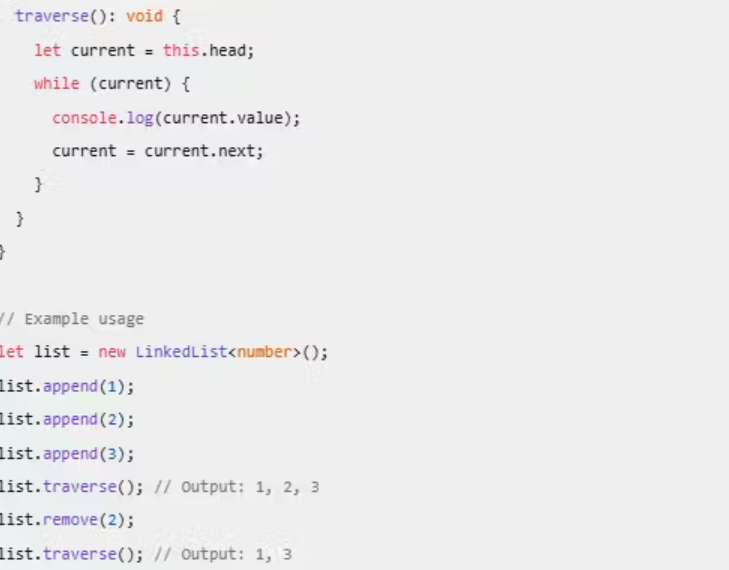
Explain how to create a singly or doubly linked list in TypeScript using classes.
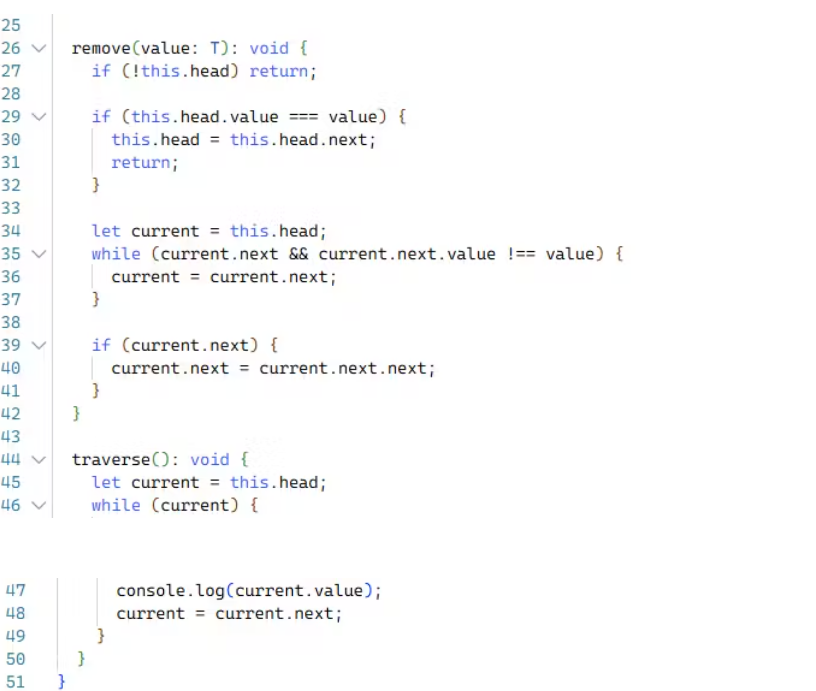
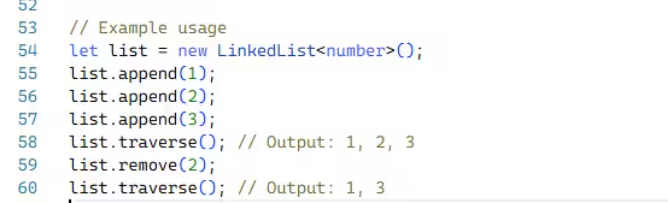
Provide an example of adding, removing, and traversing nodes.
Linked List in TypeScript
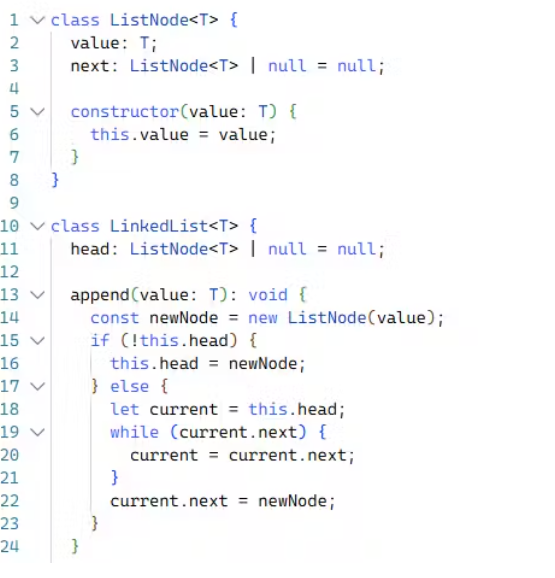
A singly linked list is a linear data structure where each element (node) points to the next node in the sequence. Here’s how you can implement it using classes in TypeScript:
Node Class
First, define a
Nodeclass to represent each element in the list.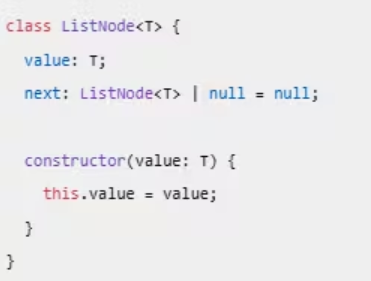
LinkedList Class
Next, define a
LinkedListclass to manage the nodes.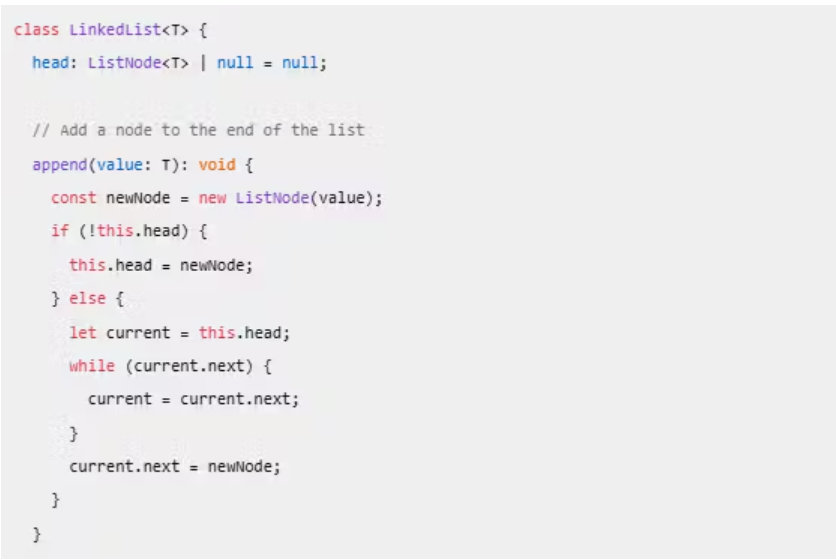
Creating a Doubly Linked List in TypeScript
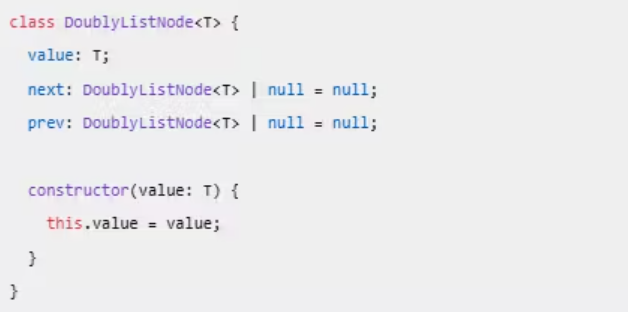
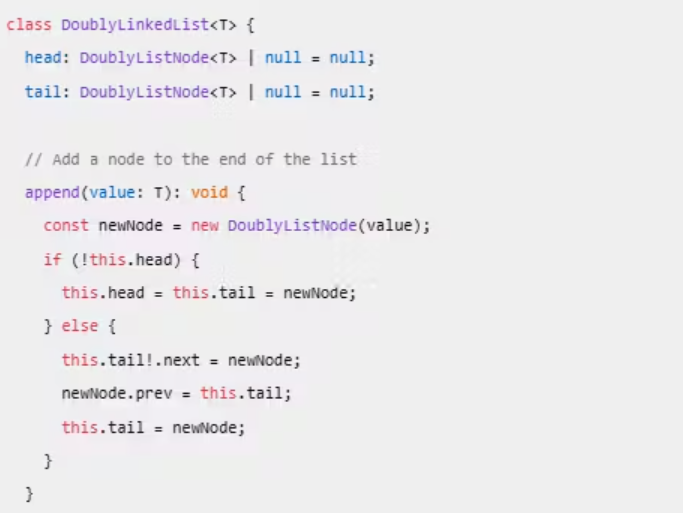
A doubly linked list is similar to a singly linked list, but each node points to both the next and the previous node.
Node Class
Define a
Nodeclass for the doubly linked list.
DoublyLinkedList Class
Define a
DoublyLinkedListclass to manage the nodes.
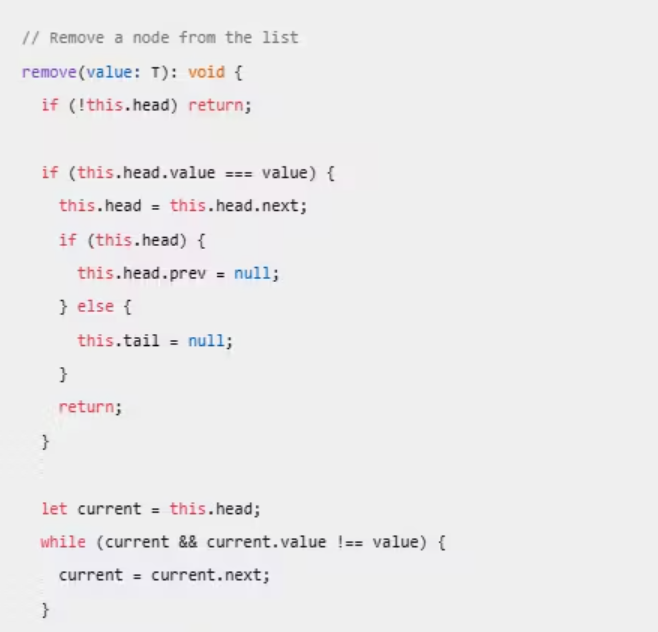
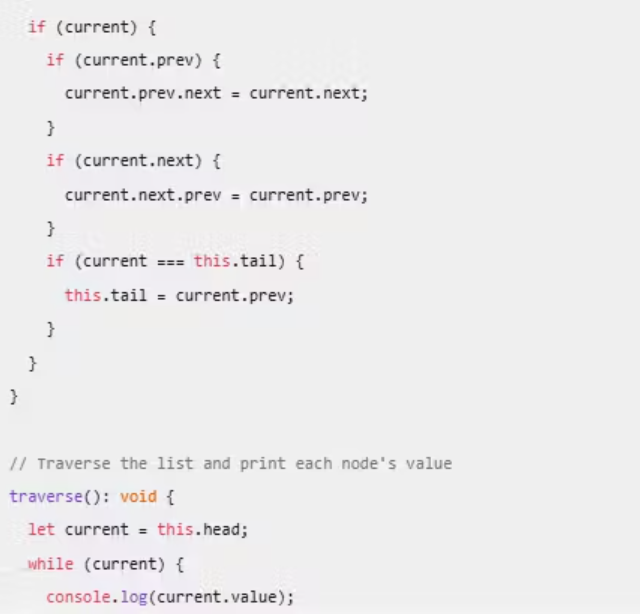
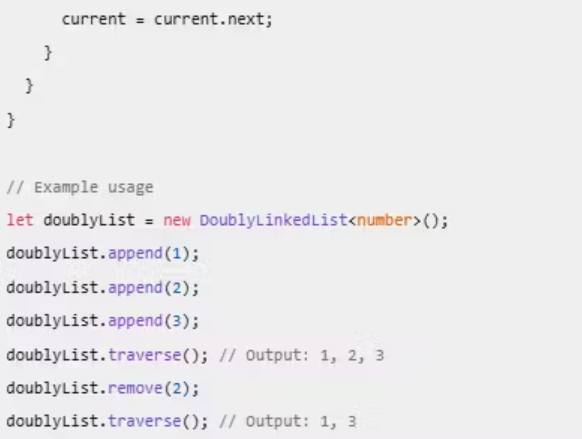
Singly Linked List: Each node points to the next node.
Doubly Linked List: Each node points to both the next and the previous node.
Common Operations: Adding (
append), removing (remove), and traversing (traverse) nodes.HashMap (or Object/Map):
Define how to create a key-value pair data structure in TypeScript using Map or an object.
Provide examples of inserting, deleting, and searching for values by keys.
Creating a Key-Value Pair Data Structure in TypeScript
In TypeScript, you can create key-value pair data structures using either an object or the
Mapclass. Both approaches have their own use cases and advantages.Using an Object
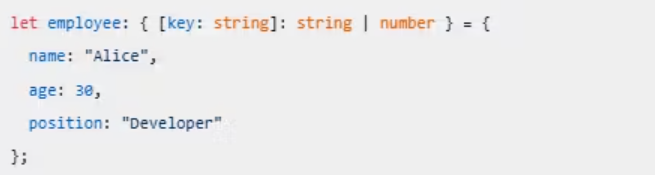
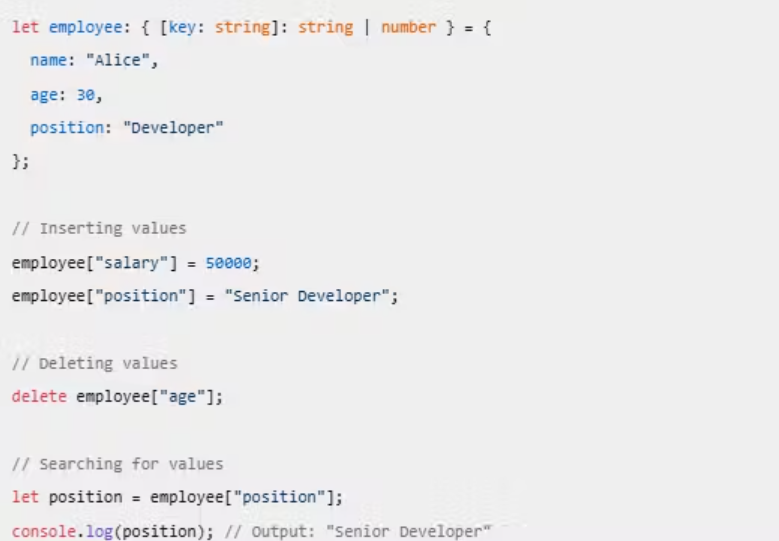
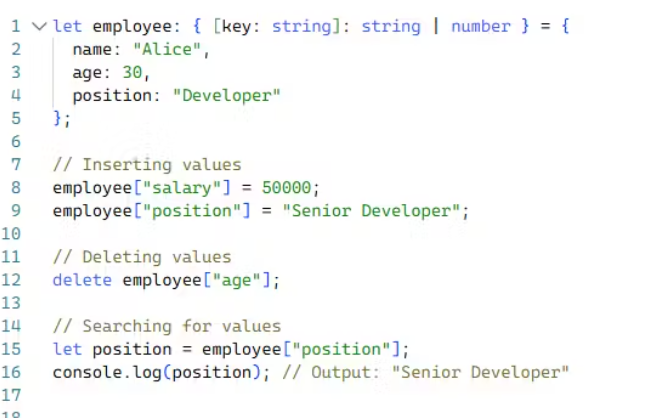
Objects in TypeScript can be used to store key-value pairs. Here’s how you can define and manipulate an object:
Defining an Object
You can define an object with specific key-value pairs:
Inserting Values
To add or update values in the object:

Deleting Values
To delete a key-value pair from the object:

Searching for Values
To access a value by its key:

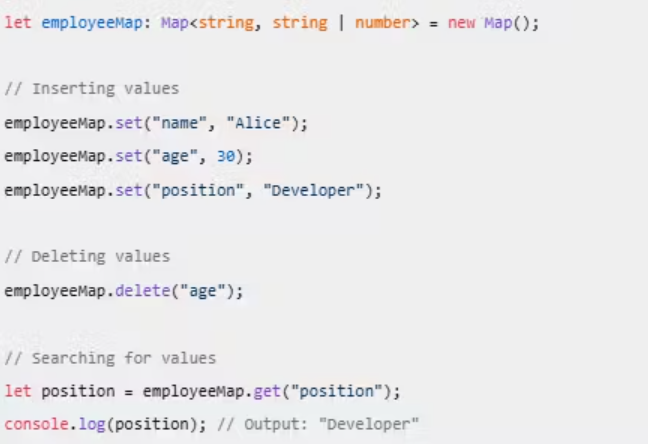
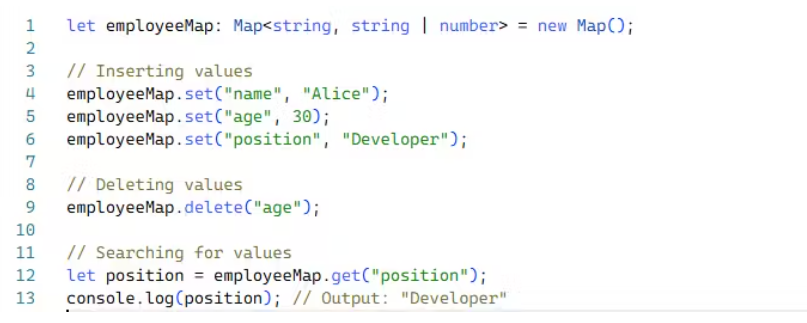
Using a Map
The
Mapclass in TypeScript provides a more flexible way to handle key-value pairs, especially when keys are not strings.Defining a Map
You can define a
Mapwith specific types for keys and values:

Inserting Values
To add or update values in the map:
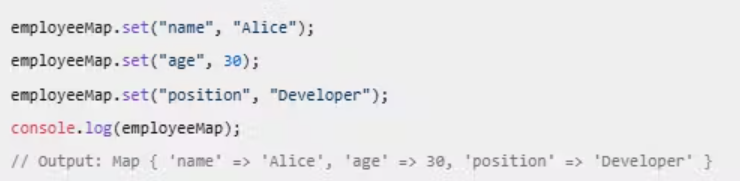
Deleting Values
To delete a key-value pair from the map:

Searching for Values
To access a value by its key:

Example
Here’s a complete example demonstrating the use of both an object and a map:
Using an Object
Using a Map
Objects: Useful for simple key-value pairs where keys are strings.
- Maps: Provide more flexibility, allowing keys of any type and maintaining insertion order.
Set:
Explain how to create a Set to store unique elements.
Show how to add, remove, and check for elements in a set.
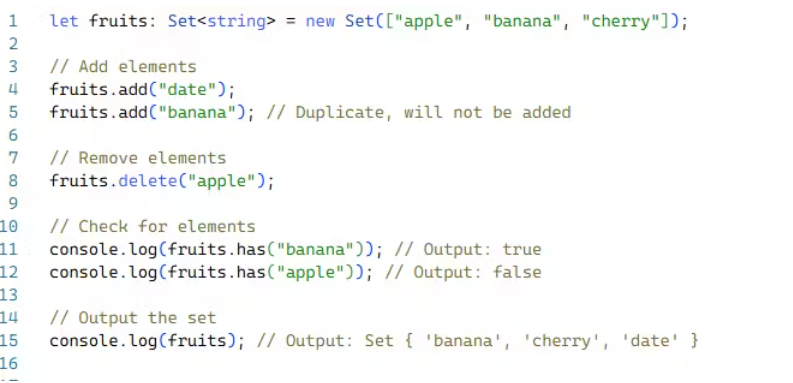
A
Setin TypeScript is a collection of unique elements. Unlike arrays, sets automatically remove duplicate values, ensuring that all elements are unique.Creating a Set
You can create a set using the
Setconstructor:
Adding Elements
To add elements to a set, use the
addmethod:

Removing Elements
To remove elements from a set, use the
deletemethod:

Checking for Elements
To check if a set contains a specific element, use the
hasmethod:

Example
Here’s a complete example demonstrating how to create a set, add elements, remove elements, and check for elements:
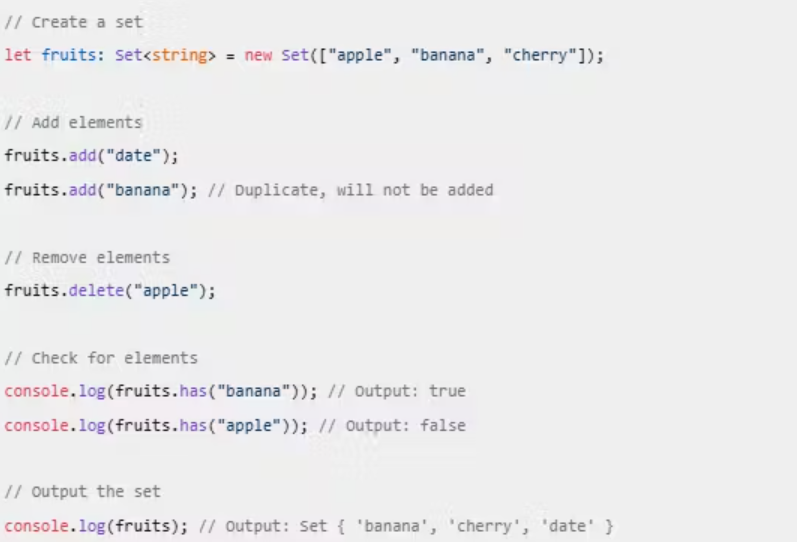
Set: A collection of unique elements.
Add Elements: Use the
addmethod.Remove Elements: Use the
deletemethod.Check for Elements: Use the
hasmethod.
Tree:
Explain how binary trees or binary search trees (BST) can be implemented in TypeScript.
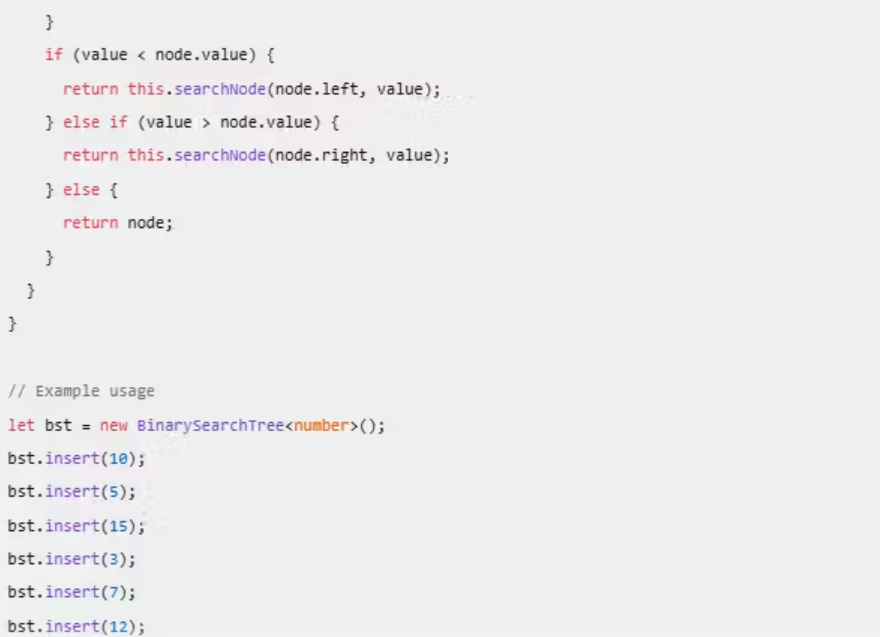
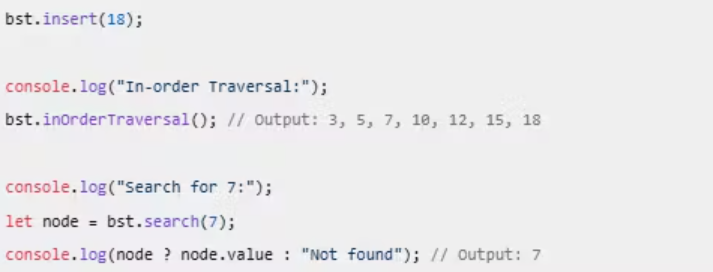
Provide an example showing how to insert nodes, traverse the tree, and search for elements.
Implementing a Binary Search Tree (BST) in TypeScript
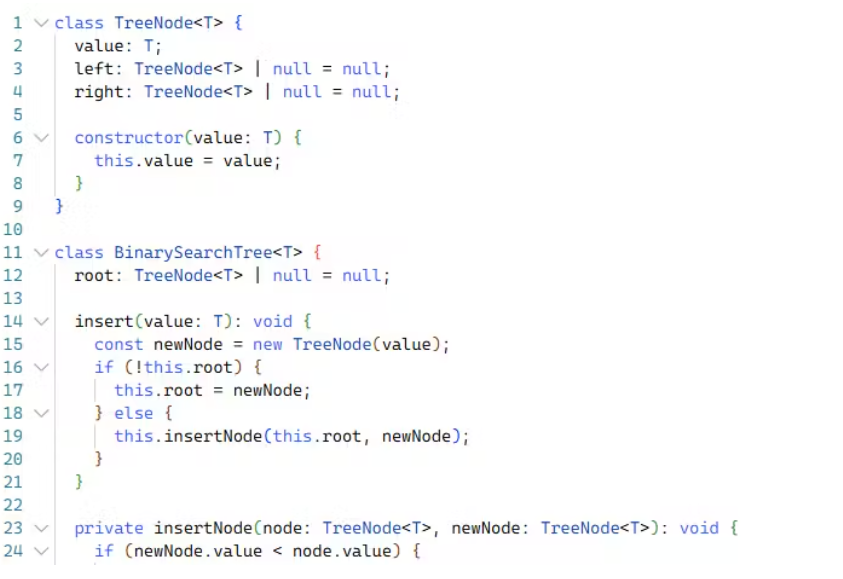
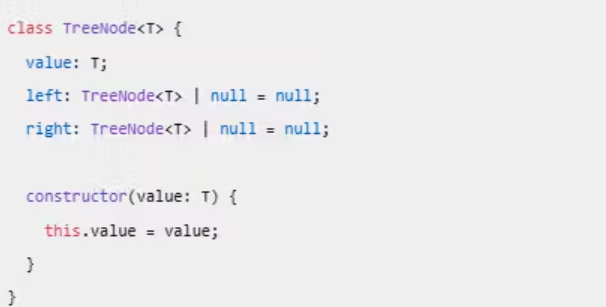
A Binary Search Tree (BST) is a node-based data structure where each node has at most two children, referred to as the left child and the right child. For a BST, the left child node’s value is always less than the parent node’s value, and the right child node’s value is always greater.
Node Class
First, let’s define a
TreeNodeclass to represent each node in the tree.
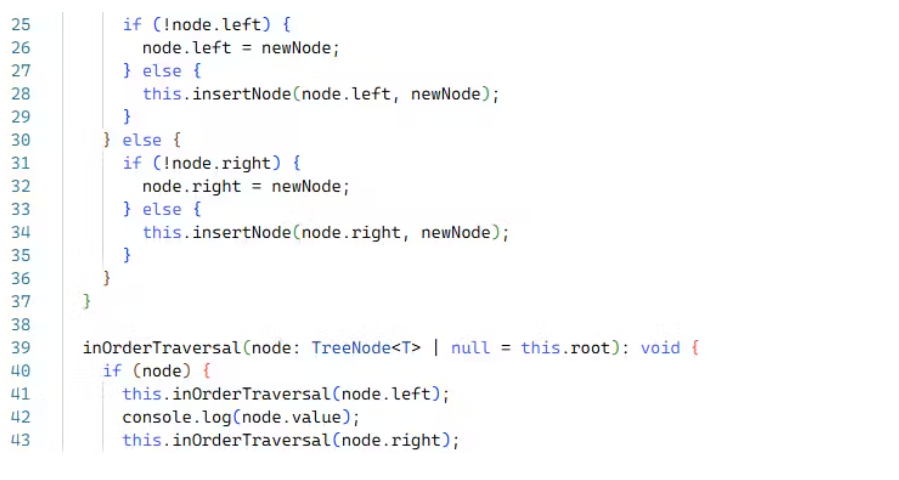
BinarySearchTree Class
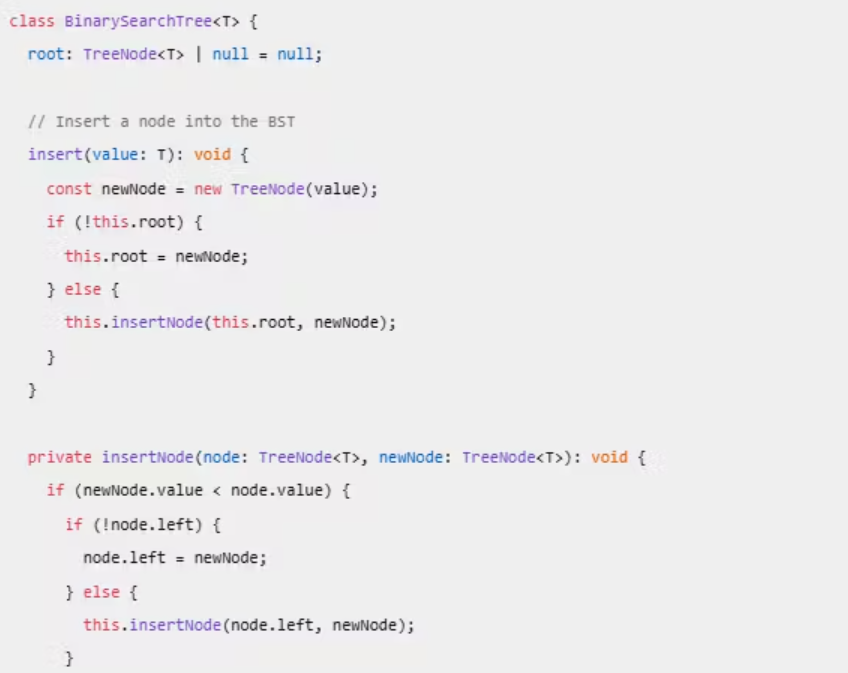
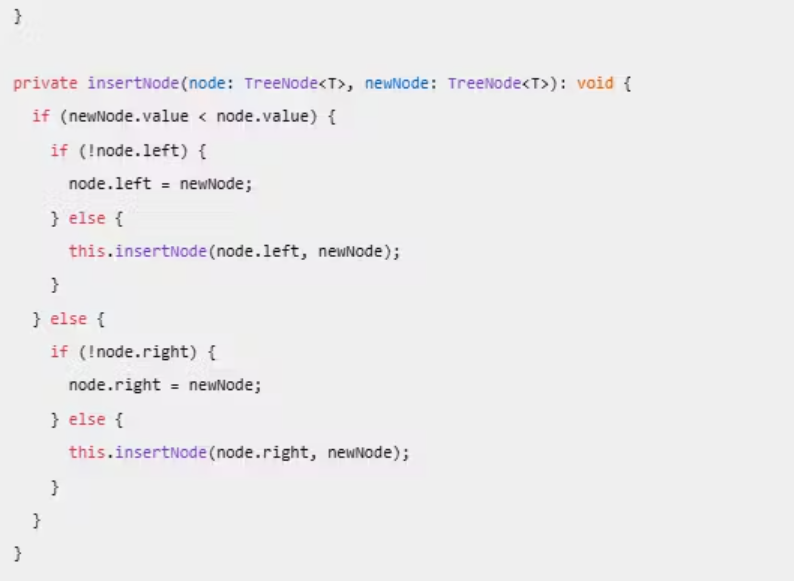
Next, we define the BinarySearchTree class to manage the nodes.
Explanation
Node Class: Defines the structure of a tree node with a value, a left child, and a right child.
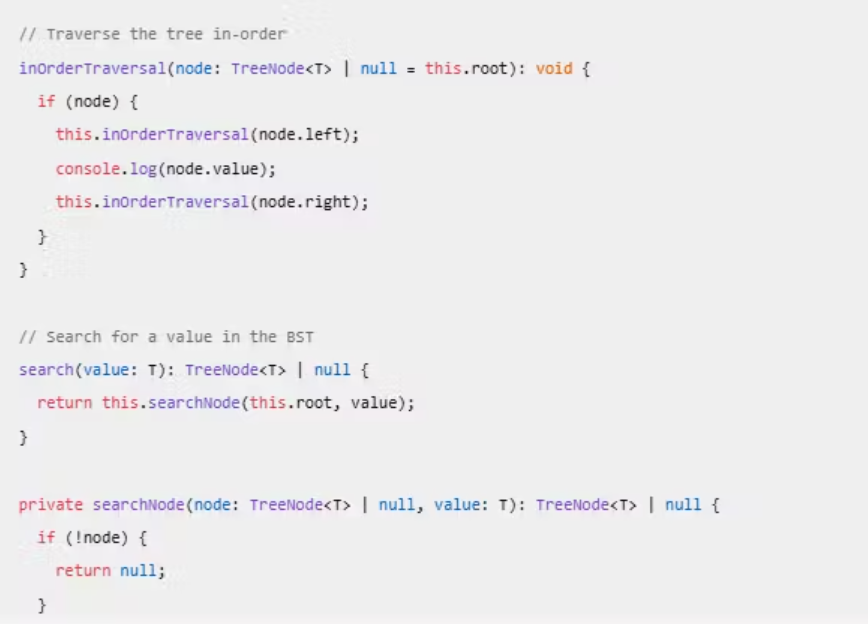
BinarySearchTree Class: Manages the BST operations:
Insert: Adds a new node to the tree while maintaining the BST properties.
In-Order Traversal: Visits nodes in ascending order (left, root, right).
Search: Finds a node with a specific value.
Deliverables:
A detailed explanation of each data structure with TypeScript examples.
- Code snippets for each data structure to demonstrate their usage.
Arrays
Explanation: Arrays are used to store multiple values of the same type in a single variable. They are the most basic data structure in TypeScript.
Tuples
Explanation: Tuples are a special type of array that allows you to store a fixed number of elements where the types of each element are known.
ArrayList (Dynamic Arrays)
Explanation: Dynamic arrays can grow or shrink in size during runtime. They allow you to add or remove elements as needed.
Stack
Explanation: A stack follows the Last In First Out (LIFO) principle. The last element added is the first one to be removed.
Queue
Explanation: A queue follows the First In First Out (FIFO) principle. The first element added is the first one to be removed.
LinkedList
Explanation: A linked list consists of nodes where each node contains a value and a reference to the next node.
HashMap (or Object/Map)
Explanation: A key-value pair data structure that allows you to store and retrieve values using keys.
Using Object:
Using Map:
Set
Explanation: A collection of unique elements.
Binary Search Tree (BST)
Explanation: A tree where each node has at most two children, with the left child’s value less than the parent and the right child’s value greater.