Activity #14: Database Constraint

Research Database Constraints:
- Database Constraints define the conditions imposed on the behavior of a database Table.
Foreign Key Constraint
- Constraints enforce referential integrity, which essentially says that if column value A refers to column value B, then column value B must exist.
Primary Key Constraint
- Constraint specifies that the constrained columns' values must uniquely identify each row. A table can only have one primary key, but it can have multiple unique constraints.
Unique Constraint
- A unique constraint is the rule that the values of a key are valid only if they are unique. A key that is constrained to have unique values is called a unique key .
Check Constraint
- Constraint is a type of integrity constraint in SQL which specifies a requirement that must be met by each row in a database table.
Not Null Constraint
- Constraint is used to ensure that a given column of a table is never assigned the null value. Once a NOT NULL constraint has been defined for a particular column, any insert or update operation that attempts to place a null value in that column will fail.
Default Constraint
- Constraint is used to set a default value for a column. The default value will be added to all new records, if no other value is specified.
Brief Explanation of Each Constraint:
Foreign Key Constraint:
Explanation: Creates a relationship between two tables by referencing another tables main key.
Data Integrity: Ensures that the data in the associated tables are consistent and valid.
Primary Key Constraint:
Explanation: A distinct type of UNIQUE constraint that identifies each record in a table.
Data Integrity: Determines the main identifier for a table, guaranteeing that each entry has a unique key.
Unique Constraint:
Explanation: Ensures that each value in a column is unique.
Data Integrity: Prevents duplicate entries, maintaining consistency and accuracy.
Check Constraint:
Explanation: Enforces a condition that must be met for data to be inserted or updated in a column.
Data Integrity: Restricts data values to a specific range, format, or set of rules, preventing invalid entries.
Not Null Constraint:
Explanation: Ensures that a column cannot contain null values.
Data Integrity: Prevents incomplete records and ensures that essential information is always present.
Default Constraint:
Explanation: Specifies a default value for a column if no value is provided during data entry.
Data Integrity: Ensures that columns always have a value, even if not explicitly specified.
Example Scenarios:
a table of customer orders might have a
usercolumn with a foreign key attribute that links it to theuser_idcolumn in a users table see above. This way, each row in the orders table can be associated with a specific user from the users table and no orders can enter the system unless theyre connected to a valid, existing user.foreign keys put the “relational” in “relational database” they help define the relationships between tables. They allow developers to maintain referential integrity across their database. Foreign keys also help end users by preventing errors and improving the performance of any operation that’s pulling data from tables linked by indexed foreign keys.
Document Your Research:
FOREIGN KEY
→ A FOREIGN KEY links one table to another. It ensures referential integrity by enforcing that a column’s values must match a value from another table’s PRIMARY KEY or UNIQUE column.
- Example: In an
orderstable, thecustomer_idcan be a foreign key that references thecustomerstable.
CREATE TABLE customers (
    customer_id INT PRIMARY KEY,
    name VARCHAR(100)
);

CREATE TABLE orders (
    order_id INT PRIMARY KEY,
    order_date DATE,
    customer_id INT,
    FOREIGN KEY (customer_id) REFERENCES customers(customer_id)
);
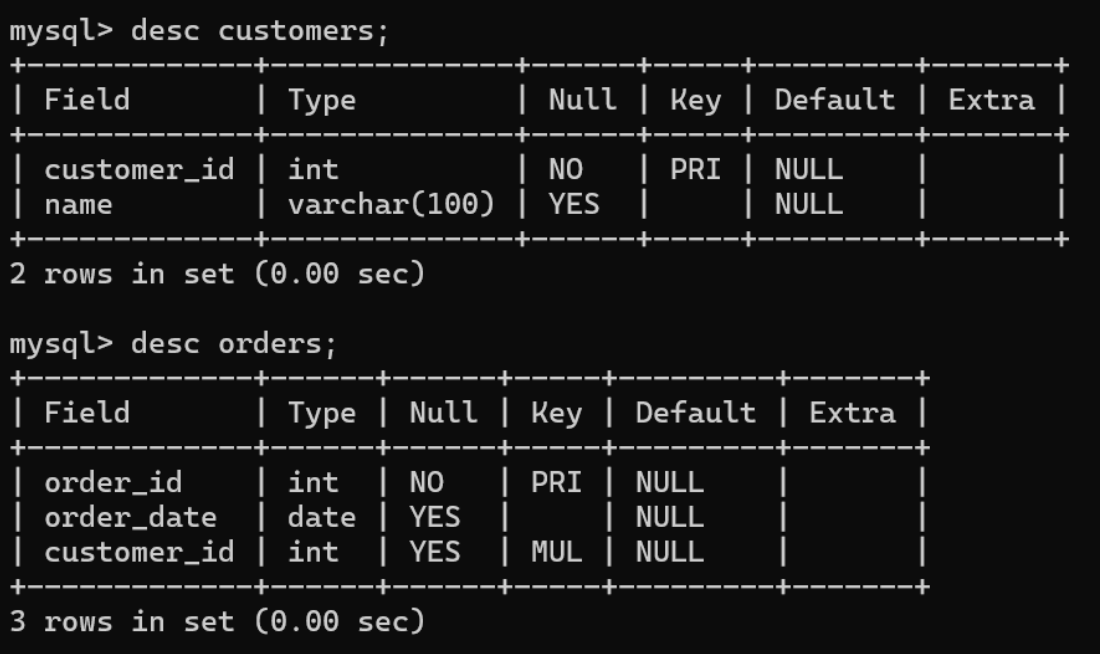
- The customer_id in the orders table must correspond to an existent customer_id in the customers table.
Primary Key Constraint
→ PRIMARY KEY A PRIMARY KEY is a unique identifier for each record in a table. It ensures that no two rows can have the same primary key value, and it does not allow NULL values.
Example: In an employees table, employee_id might be set as the primary key.
CREATE TABLE employees (
    employee_id INT PRIMARY KEY,
    name VARCHAR(255),
    position VARCHAR(255)
);
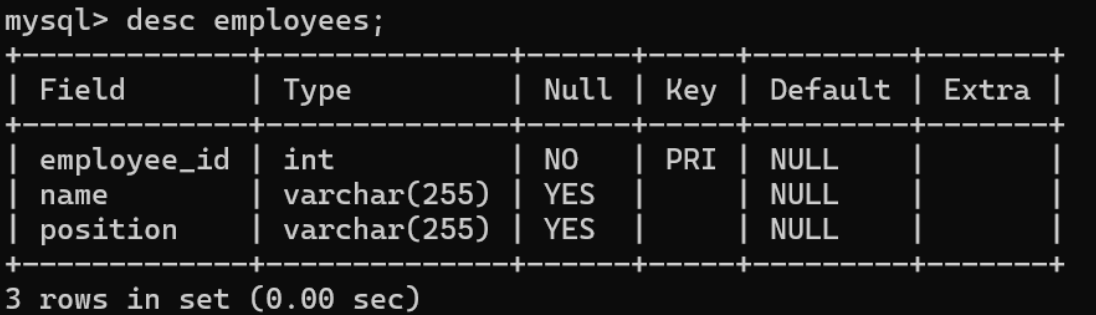
- By doing this, it will be guaranteed that each employee's employee_id is distinct and cannot be NULL.
UNIQUE
→ A UNIQUE constraint ensures that all values in a column are distinct. Unlike a primary key, a table can have multiple UNIQUE constraints, but a column with a UNIQUE constraint can still accept a single NULL value.
- Example: In an
employeestable, you might want to ensure that each email is unique.
    CREATE TABLE employees (
        employee_id INT PRIMARY KEY,
        name VARCHAR(255),
        email VARCHAR(255) UNIQUE
    );
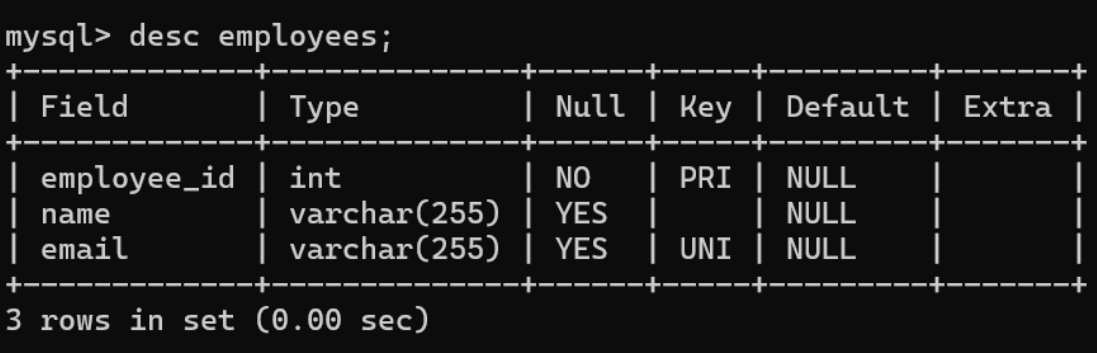
- By doing this, it will be impossible for two workers to share one email account.
CHECK
→ A CHECK constraint enforces that all values in a column satisfy a specific condition.
- Example: In an
employeestable, you could enforce a rule that the employee’s age must be at least 18.
    CREATE TABLE employees (
        employee_id INT PRIMARY KEY,
        name VARCHAR(255),
        age INT,
        CHECK (age >= 18)
    );
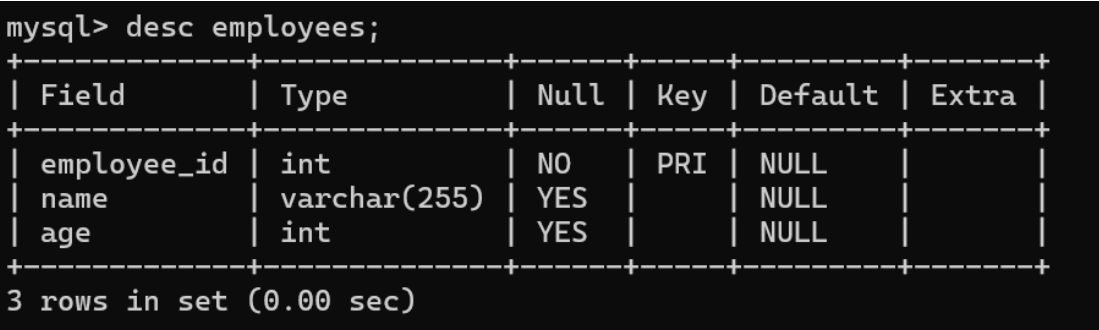
- This ensures that no one under the age of 18 can be inserted into the table.
NOT NULL
→ A NOT NULL constraint ensures that a column cannot store NULL values. This means that a value must be provided when inserting or updating a record.
- Example: In an
employeestable, thenamecolumn might be required to always have a value.
    CREATE TABLE employees (
        employee_id INT PRIMARY KEY,
        name VARCHAR(255) NOT NULL
    );
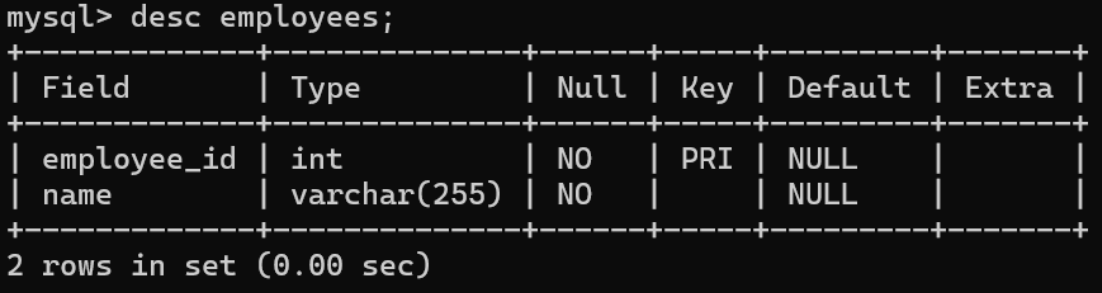
- it is mandatory to provide a value for the
namecolumn
DEFAULT
→ A DEFAULT constraint sets a predefined value for a column if no value is provided during an insert operation.
- Example: In an
orderstable, you might want to automatically assign the current date to theorder_datecolumn if no date is provided.
CREATE TABLE orders (
    order_id INT PRIMARY KEY,
    order_date DATE DEFAULT '2001-09-14'
);
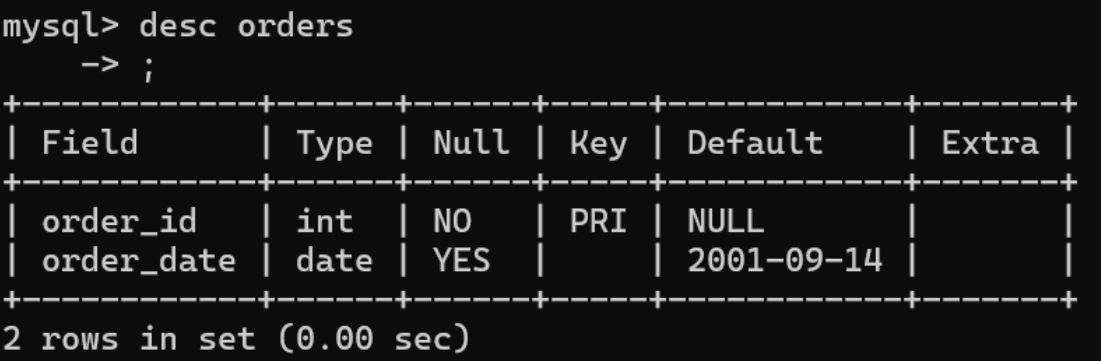
- if no
order_dateis provided, it will default to'2000-09-14'.


